Application Client Container: A Complete Enterprise Java Guide
Introduction
An Application Client Container (ACC) is a Java EE and Jakarta EE component that enables client applications to access enterprise services securely. It provides built-in features such as authentication, dependency injection, JNDI lookup, transaction support, and remote communication.
Organizations use the ACC to connect desktop applications with EJBs, databases, messaging systems, and other backend resources. This simplifies development and improves application reliability.
What Is an Application Client Container?
An Application Client Container (ACC) is a runtime environment for Java EE and Jakarta EE client applications. It allows desktop-based applications to connect with enterprise services running on an application server.
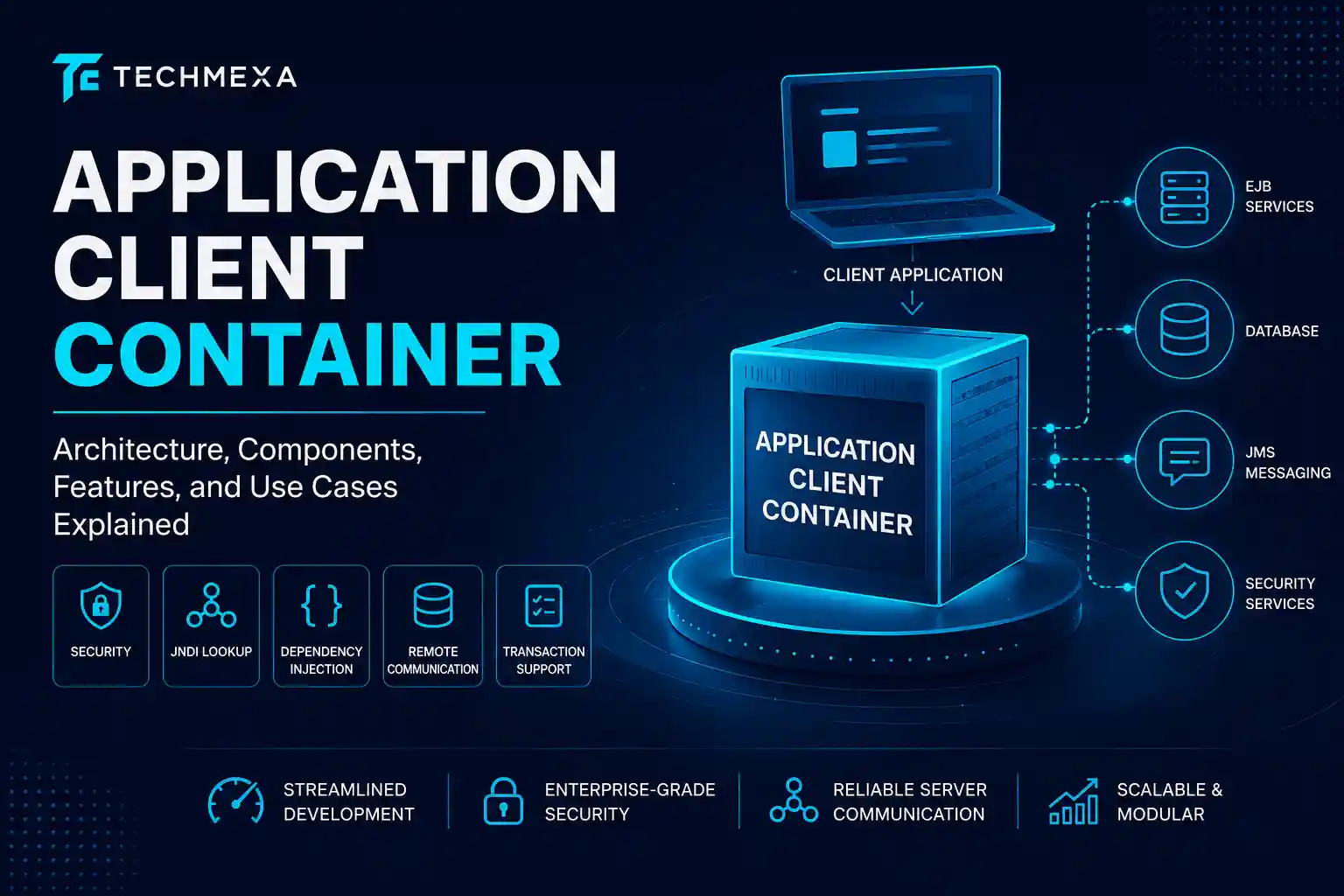
The ACC sits between the client application and the server. It manages communication and provides built-in enterprise services.
Developers use the ACC to access resources such as Enterprise JavaBeans (EJBs), messaging services, and databases. This reduces the amount of code needed in the client application.
The container also handles important functions automatically. These include security, dependency injection, JNDI lookups, transaction management, and lifecycle management.
Unlike a web container, an Application Client Container is designed for standalone Java clients. It runs on the user’s machine while maintaining a secure connection to enterprise systems.
Application Client Container Architecture
The Application Client Container architecture follows the Java EE multi-tier model. It connects client applications with enterprise services while managing communication, security, and resource access.
The Java EE Client Tier
The client tier is the user-facing layer of a Java EE application. It contains different client types that interact with enterprise services.
Application Client Container (ACC)
The ACC runs standalone Java applications. It provides services such as authentication, dependency injection, and remote EJB access.
Applet Container
An applet container executes Java applets within a browser environment. Today, applets are largely obsolete.
Web Clients
Web clients are browser-based applications. They interact with backend services through web containers.
EJB Container
The EJB container hosts enterprise business logic. Client applications communicate with these components through remote calls.
Three-Tier Architecture Overview
Most ACC deployments follow a three-tier architecture.
Client Tier
The client tier contains the user-facing application. The ACC operates within this layer.
Middle Tier
The middle tier contains the application server, business logic, security services, and messaging components.
Backend Tier
The backend tier stores enterprise data. It typically includes databases and legacy systems.
Thin Client vs. Fat Client
| Feature | Thin Client | Fat Client |
|---|---|---|
| Processing | Server-side | Client-side |
| Resource Usage | Low | Higher |
| Installation | Simple | More complex |
| Maintenance | Centralized | Local updates |
| Offline Support | Limited | Better |
| Performance | Network dependent | Less network dependent |
Thin clients rely heavily on server resources. Fat clients perform more processing locally.
Key Features of the Application Client Container
The ACC provides several enterprise-level capabilities.
Lightweight Nature
The ACC is lighter than a full application server. It includes only the services required by the client application.
Client-Side Deployment
The container runs on the client machine. This allows enterprise applications to access backend services without installing a complete server environment.
Standardized Services
The ACC provides built-in services such as security management, dependency injection, JNDI lookup, and lifecycle handling.
These services reduce development effort and improve consistency.
Server Communication
The ACC enables communication with EJBs, JMS services, databases, and other enterprise resources.
This ensures reliable interaction between client applications and backend systems.
Core Components of the Application Client Container
Several components work together inside the Application Client Container. These components enable communication, security, and resource access.
Client-Side JVM
The client application runs inside a Java Virtual Machine (JVM). The JVM provides the runtime environment required to execute Java applications.
It also manages memory and application execution.
Deployment Descriptor (application-client.xml)
The application-client.xml file contains deployment settings for the application. It defines configuration details used by the container.
This helps the ACC understand application requirements and resource references.
JNDI Lookup
Java Naming and Directory Interface (JNDI) allows applications to locate enterprise resources dynamically.
Clients use JNDI to find EJBs, data sources, and messaging services without hard-coded locations.
Dependency Injection (DI)
Dependency Injection automatically provides required resources to application components.
This reduces manual configuration and improves maintainability.
RMI-IIOP and Remote Method Invocation
RMI-IIOP enables communication between client applications and remote EJBs.
It allows methods to be invoked across different systems in a distributed environment.
JAAS Authentication
Java Authentication and Authorization Service (JAAS) handles user authentication and authorization.
It verifies identities before granting access to protected resources.
Read More : Core App Dashboard: Features, Benefits, Use Cases & Best Practices in 2026
What Are Core Services Provided?
The ACC includes several built-in enterprise services.
Security Management
The container manages authentication and authorization processes.
This helps protect enterprise resources from unauthorized access.
JNDI Lookup Services
JNDI services allow applications to discover resources dynamically.
This improves flexibility and simplifies configuration.
Dependency Injection
The ACC injects required resources automatically.
Developers can focus more on business logic and less on infrastructure code.
Lifecycle Management
The container controls application startup, execution, and shutdown.
This ensures resources are managed efficiently.
Transaction Support
The ACC helps coordinate transactions across enterprise systems.
It maintains data consistency and reliability.
Types of Application Client Container
Different client technologies can operate within an enterprise environment.
Stand-alone Thin Clients and Resource Adapter for JMS
These clients rely heavily on server-side processing.
They often use JMS resource adapters for message-based communication.
Java EE Client
A Java EE client runs inside an Application Client Container.
It can access EJBs, JMS services, and other enterprise resources.
Java Thin Client
A Java thin client focuses mainly on the user interface.
Most processing takes place on the server.
Applet Client
An applet client runs inside an applet container within a web browser.
Although outdated, it was once a common Java client technology.
ActiveX to Enterprise JavaBeans (EJB) Bridge
This bridge allows Microsoft ActiveX applications to communicate with EJB components.
It helps integrate legacy Windows applications with enterprise Java systems.
Why the Application Client Container Is Rising in the U.S. Market?
Many organizations continue to rely on enterprise Java applications. The ACC allows them to modernize client applications without replacing existing infrastructure.
The growth of distributed systems has also increased demand for secure client-server communication.
Security requirements are another factor. Organizations need standardized authentication, authorization, and encrypted communication.
Industries such as banking, healthcare, and government continue to depend on enterprise Java technologies. This keeps the ACC relevant in the U.S. market.
How Application Client Container Works?
The ACC follows a structured process to connect client applications with enterprise services.
Packaging
Developers package the application with required libraries and configuration files.
Deployment
The application is deployed to the target environment with appropriate settings.
Client Launch
The user launches the client application.
The Application Client Container starts and initializes required services.
Container Bootstrap
The ACC loads configuration data and prepares security, naming, and communication services.
Authentication
The container verifies user credentials before granting access to enterprise resources.
Remote Communication
The ACC establishes connections with EJBs, JMS services, databases, and other backend components.
Response Handling
The server processes the request and sends a response.
The ACC receives the result and delivers it to the client application.
Advantages of Application Client Container
Application Client Containers offer several benefits for enterprise applications.
Streamlined Development
The ACC provides built-in services such as security, dependency injection, and resource lookup.
This reduces development time and complexity.
Consistent Enforcement of Security
Authentication and authorization are managed by the container.
This helps maintain consistent security policies across applications.
Reliable Server Communication
The ACC manages communication with remote enterprise services.
This improves stability and reduces connection-related issues.
Reusable and Modular Architecture
Applications can reuse enterprise services and components.
This improves scalability and simplifies maintenance.
Common Challenges and How to Overcome Them
Despite its advantages, the ACC presents several challenges.
Configuration Complexity Across Environments
Different environments may use different settings.
Standardized configuration management helps reduce deployment issues.
Version Compatibility
Mismatched library and server versions can create compatibility problems.
Regular updates and testing help prevent these issues.
Debugging Distributed Communication
Troubleshooting remote calls can be difficult.
Detailed logging and monitoring tools make debugging easier.
Limited Suitability for Web-Based Clients
The ACC is designed primarily for standalone Java applications.
Modern web applications generally use web containers instead.
Who Might Benefit from Application Client Container Technology?
The ACC is valuable for organizations that rely on enterprise applications.
- Large enterprises
- Financial institutions
- Healthcare organizations
- Government agencies
- Manufacturing companies
- Software development teams
- Organizations using Java EE or Jakarta EE
These organizations benefit from secure access to enterprise resources and services.
Real-World Applications Areas
Banking Applications
Banks use ACC-based applications to access customer accounts, payment systems, and transaction services securely.
Order and ERP Management Platforms
ERP systems use the ACC to connect desktop applications with inventory, sales, and procurement modules.
Healthcare Data Systems
Healthcare organizations use enterprise applications to manage patient records and clinical data securely.
JMS Messaging Clients
ACC-based clients can send and receive messages through JMS platforms.
This supports reliable communication across distributed systems.
Application Client Container Security Features
Security is one of the most important functions of the ACC.
JAAS-Based Login
JAAS verifies user identities before granting access to protected resources.
SSL/TLS Transport Security
SSL/TLS encrypts data during transmission.
This protects sensitive information from interception.
Propagated Security Context
The ACC can pass user security credentials across enterprise components.
This ensures consistent security enforcement.
Resource Authorization
The container verifies whether users have permission to access specific resources.
This strengthens application security.
Application Client Container vs Applet Container
| Feature | Application Client Container | Applet Container |
|---|---|---|
| Purpose | Enterprise client applications | Browser-based applets |
| Environment | Standalone client machine | Web browser |
| EJB Access | Supported | Limited |
| Security | Advanced | Restricted |
| Deployment | Client application | Web page |
| Modern Usage | Common in enterprises | Mostly obsolete |
The ACC is designed for enterprise applications, while applet containers were designed for browser-based Java applications.
Application Client Container in Modern Architectures
Many organizations still use ACC technology alongside modern systems.
When to Use the ACC Today
The ACC is useful when desktop applications need direct access to enterprise services.
It remains common in banking, healthcare, and government systems.
Docker Containerization and the ACC
Docker packages applications at the operating system level.
The ACC provides enterprise services within the Java runtime environment.
Organizations can use both technologies together.
Application Client Container in Distributed Systems
The ACC plays an important role in distributed architectures.
It enables secure communication between client applications and remote services.
Using technologies such as EJB, JMS, and RMI-IIOP, the ACC simplifies interaction across multiple systems.
Key benefits include:
- Secure remote communication
- Centralized security management
- Dynamic resource discovery
- Better scalability
- Reduced client-side complexity
Java EE Client Application Deployment: Best Practices
Follow these best practices for successful deployments:
- Use consistent configuration files
- Keep dependencies updated
- Secure sensitive credentials
- Optimize JNDI resource management
- Implement strong authentication
- Enable SSL/TLS encryption
- Use centralized logging
- Test in a staging environment
- Document deployment procedures
These practices improve security, reliability, and maintainability.
Conclusion
The Application Client Container (ACC) provides a secure and managed environment for enterprise Java client applications. It simplifies access to EJBs, JMS services, databases, and other enterprise resources.
With built-in features such as security, dependency injection, and remote communication, the ACC reduces development complexity and improves reliability. It remains an important technology for many enterprise environments.
Frequently Asked Questions
1. What is an Application Client Container?
An Application Client Container (ACC) is a runtime environment that allows Java client applications to access enterprise services such as EJBs, JMS resources, and databases.
2. What are the main services provided by an ACC?
The ACC provides security, JNDI lookup, dependency injection, lifecycle management, and remote communication services.
3. What is the role of JNDI in an ACC?
JNDI helps client applications locate enterprise resources such as EJBs, data sources, and messaging services.
4. Is an Application Client Container still relevant today?
Yes. Many organizations still use ACCs to support enterprise Java applications and distributed systems.
5. What is the difference between an ACC and an Applet Container?
An ACC runs standalone enterprise client applications, while an Applet Container runs Java applets inside a web browser.